Turbo Email Answer - Antwortbeschleuniger & Auto-Responder
Intelligenter E-Mail-Client für die effiziente E-Mail-Beantwortung mittels intelligenter Textbausteine, sowie für vollautomatisches Autoresponding
 |
E-Mail-Beantwortung & Weiterleitung mittels Textbaustein (Variablen & Makros) | |
|
Vollautomatischer E-Mail Auto-Responder | |
|
Allgemeiner Windows Hotkey-Zugriff auf Textbausteine | |
|
Skript-Automatisierung und
ODBC/SQL/Access-Datenbankzugriff (eingebaute Python Skriptsprache) |
|
|
Nahtlose Integration mehrerer
Email-Box'en und Email-Systeme ( POP/SMTP, IMAP, MS Outlook, Outlook Express, Eudora, Netscape, ... ) |
|
Free Trial Download | €24.90 | Für Windows™ |
Diese Software beschleunigt signifikant die interaktive E-Mail-Beantwortung mittels intelligenter Textbausteine. Der eingebaute Auto-Responder ermöglicht ebenso vollautomatische Antworten, Weiterleitungen und Vor-Filterungen. Dieses Werkzeug reduziert die Kosten für E-Mail-Support erheblich und optimiert die gesamte E-Mail-Kommunikation. Es wurde besonders auf vielfältige, fein abgestufte Automatisierungsmöglichkeiten und eine effiziente Bedieneroberfläche geachtet: Das Eintippen der Anfangsbuchstaben von Schlüsselnamen startet bestimmte Anwort-Templates. Beantwortete Emails können automatisch in vordefinierte Ordner verschoben werden. Eingehende Mails können dem wahrscheinlichsten Template zugeordnet werden oder auch vollautomatisch beantwortet werden. Auf alle Textbausteine kann per Windows-Hotkey und Zwischenablage von überall her schnell zugegriffen werden. Intelligente Variablen, Makro-Ausdrücke und sogar rekursives Einfügen von anderen Textbausteinen wird unterstützt. Für fortgeschrittene Automatisierungen ist eine komplette Python-Makro-Sprache eingebaut, die z.B. sogar ODBC-Datenbankabfragen ermöglicht. TEA kann gleichzeitig mehrere E-Mail Boxen und andere Client-Software integrierten: Direkte Unterstützung von POP/SMTP und IMAP Accounts, MS Outlook, Outlook Express, Eudora, beliebige MAPI kompatible Mail-Software, .
Features:
- Keyboard triggered answer & forward templates
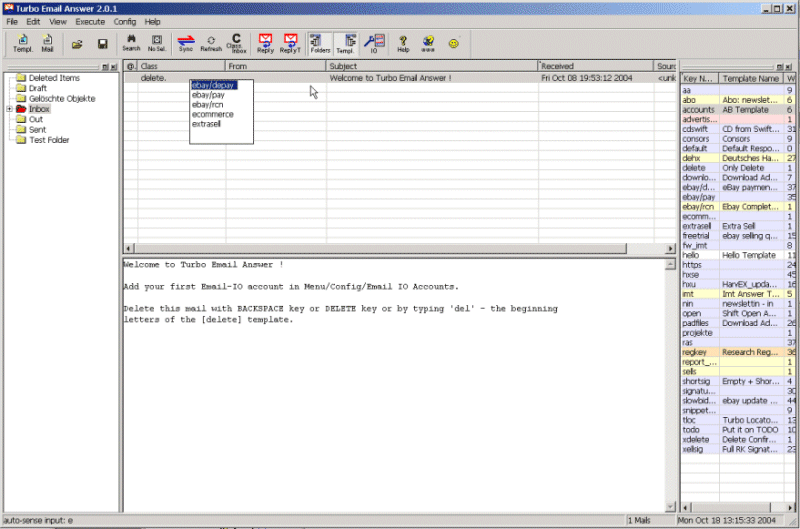
Answer templates can by triggered quickly simply by typing the beginning letters of template's key-names while you are in the inbox or in the email pre-viewer. E.g.: you have the cursor in the inbox list on a mail | You see its a certain question regarding your eBay product | Type the beginning letters of a template name like "eb" for "ebike" and the prepared answer is presented in your email editor. After editing and sending the answer you can simple confirm to shift the original email to a certain folder - Automatic text pre-classification to "best" template
Mails can be pre-classified to a "best" template by matching the text-body/subject/From/To-Address against word patterns or even by analyzing the text with more complex macros. - Full-automatic autoresponder (with simulation mode)
Any answer templates can be set up for auto-response. E.g. incoming mails with certain word patterns in Subject/From:/TextBody trigger the best matching template for a full-automatic (computed) responses - 1-click template-to-clipboard-copy
In TEA simply make a single mouse click on a template (in the list) --> the template text body (snippet) is in the windows clipboard - Global Windows hotkey for template-to-clipboard-copy
Press e.g. Ctrl-F10 while working in any application like Winword. A small selection drop-down appears: type beginning letters of template name. The template text body goes as text snippet to the Windows clipboard. Paste it in your document with Ctrl-V - Template driven shift to archive folders
Each answer template can define a target folder: Answered or non-answered emails are archived to the target folder (confirm option) - Template grouping & keyboard triggers
A shot key sequence like e SPACE p triggers a template with short name "ebay/payment". The slash in keynames enables to sub-access whole folders of templates - Answer templates support smart text-variables
Template text bodies and subjects can contain variables like %FromName% to insert data of the original mail or even macro computed values (e.g. taken from a database) - Recursive template inclusion (e.g. for smart signatures
and ads)
Answer templates can include text of other templates. Thus you can maintain variable signatures, sub-templates, changing advertisements at the bottom, etc. ) - Answer & Forward processing
- Mass handling of multiple selected mails with the same template
- Mass handling of pre-classified mails
Trigger pre-classified templates py pressing 2 x SPACE key on selected mails - Supported Email IO / Super-Inbox for:
- MS Outlook: Extended integration incl. shifting answered mails to Outlook's own folder tree, using Outlooks normal mail editor etc.
- MS Outlook Express: incl. using OE's normal
mail editor.
( Shifting to OE's folder tree available soon: OE Extended Integration
)
OE Extended Integration
) - Eudora, Mozilla, Netscape (MAPI interface)
- Any other MAPI enabled email client software
- Standalone POP/SMTP client is built-in
- Standalone IMAP/SMTP client is built-in
- Handles Text & HTML mails
- Macro computed answers
Macro computing of answers is another option in addition to fixed templates and simple variable personalization - Advanced macro automation
Incl. interface options to files, ODBC, importing Python modules, etc. - User defined GUI input form dialogs
Answer macros can use additional user input from GUI form; Thus you can e.g. include product data, IDs for querying databases quickly etc. in your mails - Well designed for minimum user interaction
TEA is well thought out to minimize the amount of key-pressing, clicks, etc. - Internal backup and auto-save system
Auto-cycling backup of your valuable templates and the email archive database. Backup can e.g. rotate on 10 archive versions. - Lots of extra ideas and tricks to improve efficiency
TEA kann 14 Tage frei getestet werden: Download
Free Trial ::  (2.1MB)
Newsletter-Abo
Screenshot
Download / Software Update
Akutelle Release v2.1: EmailAnswer-Setup.exe (2.1 MB; Windows). Turbo Email Answer kann 14 Tage frei getestet werden. Feedback unter feedback@xellsoft.com.
Turbo Email Answer Kaufen
Turbo Email Answer muß spätestens 14 Tage nach Installation käuflich erworben werden. Mit dem Kauf erhalten Sie einen Lizenz-Schlüssel.
Der Kauf einer Turbo Email Answer Lizenz beinhaltet:
-
Lizenz-Schlüssel zur Benutzung von Turbo Email Answer auf einem Rechner für unbegrenzte Zeit
-
E-Mail Support ( Extra Support-E-Mail-Adresse )
-
Freie Software-Updates während des gesamten Versions-Zyklus 2.x
Kauf per Paypal:
Preis: 24.90€. Kauf:  (Kreditkarte oder PayPal-Account).
Kauf per ShareIT:
Preis: 24.90€. Kauf :  ( alle gängigen Zahlungsmethoden )
Lieferung: Der Registrierungsschlüssel wird unmittelbar nach Zahlungsvalidierung per E-Mail geliefert.
Mehrfach Lizenzen
| Anzahl Lizenzen | Preis [EUR] pro User |
| 1 .. 2 | 24.90 |
| 3 .. 9 | 20.00 |
| 10 oder mehr | 17.00 |
Mehrfachlizenen von Turbo Email Answer
erwerben:
Kontakt: sales@xellsoft.com.
System Anforderungen
- Windows 98/ME, NT, 2000, 3000, XP, 7 oder höher (32bit oder 64bit)
- 100Mhz Prozessor oder schneller
- 128MB RAM
- 20MB freier Festplattenplatz
- 800 x 600 Bildschirm
Exits
- HarvEX - eBay Automatisierung und Biet-Manager
- SynchronEX - Backup und FTP Automatisierung
- Xellsoft Custom Software